
projectM Music Visualizer TV
Sperl Heavy IndustriesMusic & Audio
3.041.00 Reviews
- Version
- 8.1.2
- Installs
- 10.00K
- Age Rating
- Everyone
Screenshots



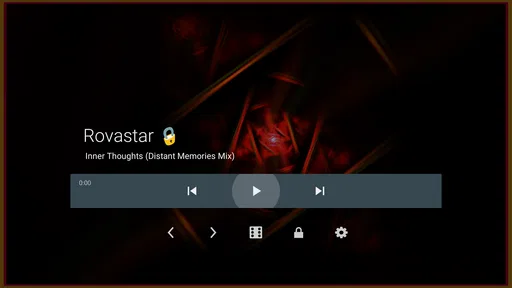

Our Review of projectM Music Visualizer TV
 Analysis by Appyee
I tend to think of a TV music visualizer as a shared screen rather than another music player: it can give a room something to look at while the sound comes from whatever setup I already use. That is the appeal of projectM Music Visualizer TV. It is an Android TV app from Sperl Heavy Industries, built around animated visuals that respond to music. I would consider it when I want a more atmospheric listening session, but I would first check that my TV and audio setup suit this kind of experience.
Where setup can feel less obvious
The idea is simple, but the first practical question is where the music is playing. A visualizer is most useful when the sound source and the TV can work together comfortably; it is less convenient if I expect the app itself to replace a full music service or a conventional player. I would decide before opening it whether the TV is meant to handle the music or simply provide the visuals alongside another device.
That distinction also helps set expectations about control. A remote is fine for navigating a TV interface, but it is not as quick as a phone when I want to browse a collection or adjust a track. For a planned listening session, that is a small trade-off. For someone who changes songs constantly, it may become the part that feels awkward.
Checks I would make before settling in
I would start by confirming that the app is being used on an Android TV device, since that is the experience it is aimed at, rather than assuming that any phone or television setup will behave the same way. Its minimum operating-system requirement is Android 8.0. The app is priced at $3.99, has an Everyone age rating, and version 8.1.2 is the current release. Those are useful points to check against the device and budget before buying.
Then I would test a short listening session before inviting people over. Put on a familiar track, keep the volume at a comfortable level, and see whether the visuals remain enjoyable from the place where the TV is actually viewed. This catches practical annoyances early: a preset that looks too busy across the room, brightness that distracts from the music, or a control path that is slower than expected.
A calmer way to recover when something feels off
If the visuals do not seem to respond as expected, I would avoid changing several things at once. First check whether music is playing through the setup I intend to use, then return to a simple listening test and see if the behavior changes. Keeping one variable at a time makes it easier to tell whether the issue is the selected audio route, the app session, or just a mismatch between the music and the visual style.
I would also treat a restart as a basic troubleshooting step rather than immediately assuming the app is broken. Close and reopen it, reconnect the intended music source if needed, and try again with a track whose playback is easy to verify. If the problem only appears in one particular arrangement, that is a useful clue: the television, audio device, and music source all have a part in the chain.
When the visualizer may not be the cause
A TV can display the animation while the sound is routed elsewhere, and that arrangement can make synchronization or control feel less straightforward than it would with a single device. I would check the television’s audio output and the music source before blaming the visualizer for a delay or an unexpected silence. The same goes for a dim or washed-out picture: screen settings and the room’s lighting can change how vivid an animation looks.
For a party, I would keep the visualizer as a backdrop and let a familiar music setup handle the playlist if that is already the smoothest way to manage songs. For a quiet evening, I would make the TV the focus, choose a less intense look, and leave the controls alone once it feels right. That small change in purpose makes the experience feel more deliberate instead of turning every session into a setup exercise.
First Impressions
Installing the app was a breeze. I found it easily in the app store, and it was up and running in no time. Once I opened it, I was greeted by a straightforward and user-friendly interface. No need to fumble around in the dark here—everything is laid out in a way that makes sense, even if you’re not a tech whiz.
Visuals That Dance to Your Beat
The real magic happens when you start playing your tunes. projectM Music Visualizer TV syncs perfectly with your music, creating stunning visualizations that seem to dance to the beat. The app boasts a variety of presets, and each one is more mesmerizing than the last. Whether you’re into smooth waves or chaotic explosions of color, there’s something here for everyone.
What really blew me away was the quality of the visuals. They’re incredibly detailed and vibrant, making them look fantastic on both small and large screens. If you’ve got a TV with a big display, you’re in for a treat!
Customization Galore
If you’re someone who likes to tinker, you’re going to love the customization options. The app allows you to adjust various settings to create a visual experience that’s uniquely yours. You can tweak parameters like color schemes, visual intensity, and more. It’s a bit like being a DJ, but for visuals!
And if you’re feeling creative, you can even create your own presets. This feature is a goldmine for those who love to experiment and push boundaries.
Performance and Compatibility
One of my main concerns was how well the app would perform, especially during intense visual sequences. I was pleasantly surprised to find that projectM Music Visualizer TV runs smoothly without any noticeable lag. The developers have clearly optimized it to ensure a seamless experience, which is crucial for maintaining immersion.
The app is also compatible with a wide range of devices. Whether you’re on Android or iOS, you’ll find it works without a hitch. And for those who love to stream music from various sources, the app supports a multitude of streaming platforms, ensuring your favorite tracks are always ready to go.
Final Thoughts
Overall, I’d say projectM Music Visualizer TV is a fantastic addition to any music lover’s toolkit. Its combination of stunning visuals, ease of use, and customization options makes it a standout app in its category. Whether you’re looking to transform your living room into a mini rave or just want a beautiful backdrop for your music, this app delivers on all fronts.
If you haven’t tried it yet, I highly recommend giving it a go. It’s an experience that elevates your music listening to a whole new level, and once you start, you might find it hard to go back to just plain old audio. So grab your favorite playlist, fire up the app, and let the visual journey begin!
Choosing it over simpler alternatives
Compared with a basic animated screensaver, a music visualizer has a more direct purpose: the changing patterns are meant to follow the sound, not merely fill empty screen space. Compared with listening through a phone with a small visualizer, the TV gives the imagery a more communal, room-sized presence. The trade-off is that a TV-based setup asks me to think about where the audio is coming from and how I will control playback.
I see this as a better fit for a living-room session than for headphones on the move. If I only want background music while working, a static image or ordinary player is less effort and may be less distracting. If I want the room to feel more alive during a gathering, or I like watching abstract patterns respond while listening, a dedicated visualizer has a clearer reason to be on screen.
Small choices that improve a session
One useful approach is to treat presets as mood choices rather than trying to find a single “best” look. I would start with a restrained pattern for spoken audio or a low-key evening, then switch to something more energetic for rhythm-heavy music. That makes the visual layer support the listening instead of competing with it. The option to make presets also gives patient users a reason to spend a little time shaping a preferred look instead of repeatedly browsing from scratch.
There is a practical viewing-distance trade-off, too. Fine, busy detail may be engaging up close but can turn into visual noise from across a room; stronger color and simpler motion may read better on a large screen. I would make adjustments from the sofa, not just while standing beside the TV, because the actual viewing position changes how intense a preset feels.
A realistic use case is a weekend evening when friends are over and someone else is choosing music. I would set the visualizer up before people arrive, test a track, and then leave the screen as atmosphere rather than making it the center of attention. That avoids interrupting conversation to navigate settings and gives the visuals a clear job. For solo listening, I would be more selective: a calmer preset and a comfortable brightness are more likely to stay pleasant over a longer session.
Who will enjoy it—and who may not
The strongest audience is someone with an Android TV who already enjoys music at home and wants a responsive visual layer without turning the session into a video-watching activity. It also suits people who like experimenting with appearance and are willing to spend time finding a style that works for their room. The app has an average rating of 3.0 from 93 ratings, alongside 41 written reviews and 10K+ installs; I would take that as a reason to keep expectations measured rather than assume every setup will feel equally smooth.
I would skip it if I mainly want a straightforward way to discover music, manage a large library, or control every part of playback from a phone. It is also not the first choice for someone who dislikes moving imagery, wants an unobtrusive screen, or has no interest in using a television as part of a listening setup. A regular music player is more practical in those cases, while a simple screensaver is enough if the goal is only to decorate the display.
What I would keep in mind before buying
The price makes the decision more deliberate than trying a free utility, so I would think about how often I will actually use a TV visualizer. If I can picture it in regular listening sessions or as a party backdrop, the specialized purpose may justify the cost. If it would be opened once out of curiosity and then forgotten, I would hold off. The Everyone content rating is broad, but the experience itself is still aimed at people who enjoy abstract animated imagery rather than anyone seeking a conventional music interface.
My overall view is that this is a focused visual companion, not an all-purpose audio solution. Its appeal is the combination of responsive patterns and room-scale viewing, with customization for people who want to tune the mood. The setup is most rewarding when the TV, music source, and controls are already arranged sensibly. I would recommend it to an Android TV owner who wants music to feel more visual at home; I would choose an ordinary player instead when convenience, library browsing, or phone-first control matters more.
Verdict
Strengths of projectM Music Visualizer TV
- Stunning visual effects enhance music experience.
- Supports various music players seamlessly.
- Customizable visuals for personalized experience.
- User-friendly interface with intuitive controls.
- Lightweight app with minimal resource usage.
Limitations of projectM Music Visualizer TV
- Limited free features without premium upgrade.
- Occasional lag on older devices.
- No offline mode for visualizations.
- Ads can interrupt the experience.
- Requires microphone access for full functionality.
Other Releases by Sperl Heavy Industries
View All
projectM Music Visualizer Pro
Music & Audio4.4
Similar Picks in This Category
View All
YouTube Music
Google LLC4.4

Samsung Music
Samsung Electronics Co., Ltd.3.8

Spotify: Music and Podcasts
Spotify AB4.3

JioSaavn - Music & Podcasts
Saavn Media Limited4.3

Lark Player:Music Player & MP3
Lark Player Studio - Music, MP3 & Video Player4.6

StarMaker: Sing Karaoke Songs
SKYWORK AI PTE. LTD.4.3
Frequently Asked Questions
What is projectM Music Visualizer TV?
projectM Music Visualizer TV is a dynamic music visualizer app that transforms your music into vibrant, visual art. It uses advanced algorithms to create stunning graphics that sync with your music, offering an immersive visual experience on your TV. It's compatible with various music sources, enhancing your listening experience.
How can I use projectM Music Visualizer TV with my music library?
To use projectM Music Visualizer TV with your music library, simply play music from your device or compatible streaming service. The app will capture the audio and generate visuals that sync with the music. Make sure your device is connected to your TV for the best experience.
Does projectM Music Visualizer TV support all music formats?
projectM Music Visualizer TV supports a wide range of music formats, including popular ones like MP3 and AAC. However, it's important to ensure that your music is being played through a compatible app or service that the visualizer can access for optimal functionality.
Is the app compatible with all TV models?
While projectM Music Visualizer TV is designed to work with most smart TVs, compatibility can vary depending on the model and the operating system. It's recommended to check if your TV supports the app's requirements or consider using a streaming device that supports app installation.
Are there customization options available within the app?
Yes, projectM Music Visualizer TV offers various customization options. Users can choose from different visualizer presets and adjust settings to personalize the visual experience. This enables you to tailor the visuals to match your mood or the genre of music you're playing.
